# Developer Environment & API Keys
URL: /docs/getting-started/create-application
> How to enable Developer Mode on SMS Pro, provision scoped API keys, assign granular permissions, and safeguard credentials.
To begin making programmatic API requests, you must enable the **Developer Environment** in your SMS Pro account and generate an API key with the appropriate security scopes.
---
## 1. Enabling Developer Mode [#1-enabling-developer-mode]
By default, the SMS Pro Console displays a simplified interface tailored for marketing and manual messaging. Enabling Developer Mode reveals advanced programmatic tools, API logs, and webhook management.
### Open Settings or Developer Preferences [#open-settings-or-developer-preferences]
Log in to the [SMS Pro console](https://smspro.com) and open **Account settings**.
### Toggle Developer Mode On [#toggle-developer-mode-on]
Locate the **Developer Mode** toggle switch and toggle it **On**.
This activates the `DEVELOPER_ENABLED` feature for your organization profile.
### Access the Developer Section [#access-the-developer-section]
Once enabled, a **Developer** group appears in the sidebar:
- **API Documentation**
- **API Keys**
- **Webhooks**
- **API Logs**
- **Sandbox**
- **Usage Metrics**
---
## 2. Choosing Your Key Type [#2-choosing-your-key-type]
In **Developer > API Keys**, SMS Pro offers two types of keys:
| Key Type | Scope & Authority | Recommended Use Case |
| :--- | :--- | :--- |
| **Master API Key** | Has full, unconstrained access across every endpoint, campaign, and wallet function in your organization. | Initial sandbox experimentation or administrative orchestration tools. Only one Master Key exists per account. |
| **Scoped API Keys** *(Recommended)* | Bound to specific permissions, environments (`live` vs `test`), dedicated traffic queues, rate limits, and optional IP allowlists. | Production microservices, third-party backend integrations, and serverless functions adhering to the **Principle of Least Privilege**. |
---
## 3. Generating a Scoped API Key [#3-generating-a-scoped-api-key]
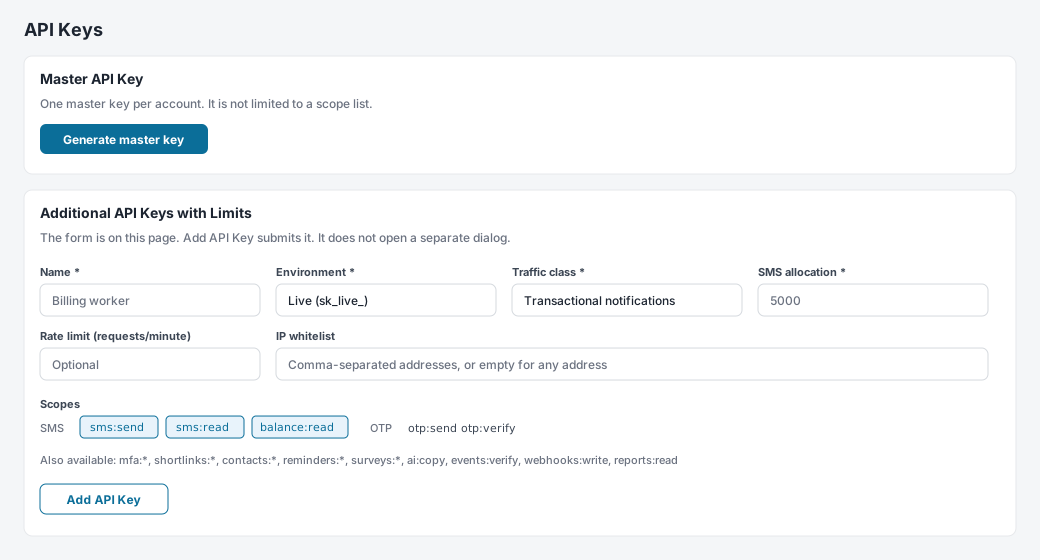
The form is already on the page. Fill it in and click **Add API Key**. It does not open a separate dialog.
### Configuration fields [#configuration-fields]
#### 1. Key name [#1-key-name]
A label for the service using this key, such as `Billing worker`.
#### 2. Environment [#2-environment]
The default is **Live (`sk_live_`)**. Choose **Test / Sandbox (`sk_test_`)** while you are integrating. Both keys call `https://api.smspro.com`. A test key simulates delivery and does not charge the wallet.
#### 3. Traffic class [#3-traffic-class]
- **OTP and 2FA**: Verification messages.
- **Transactional notifications**: Receipts, alerts, and other operational messages.
- **Marketing campaigns**: Broadcast traffic.
#### 4. SMS allocation [#4-sms-allocation]
Required. Once the key has used this many units, further sends with that key are rejected with `422 API_KEY_ALLOCATION_EXCEEDED`.
#### 5. Rate limit [#5-rate-limit]
Optional requests-per-minute cap. Above the cap the API returns `429`.
#### 6. IP whitelist [#6-ip-whitelist]
Optional comma-separated addresses. A request from any other address is rejected as an invalid key.
---
## 4. Selecting Granular Scopes [#4-selecting-granular-scopes]
Scopes define the exact permissions granted to the API key. Follow the principle of least privilege—only check the permissions your integration strictly needs:
| Domain | Scope Identifier | Description |
| :--- | :--- | :--- |
| **SMS Messaging** | `sms:send` | Authorizes single and bulk SMS dispatch via `/api/v1/public/sms/*`. |
| | `sms:read` | Read delivery statuses, message history, and job metrics. |
| | `balance:read` | Check account wallet balances and unit rates via `/api/v1/public/account/balance`. |
| **OTP & 2FA** | `otp:send` | Dispatch automated numeric one-time verification passcodes. |
| | `otp:verify` | Validate user-submitted OTP codes against active challenges. |
| **Zero-Knowledge MFA** | `mfa:challenge` | Create cryptographically blind MFA challenges. |
| | `mfa:verify` | Verify client-side zero-knowledge MFA proofs. |
| | `mfa:read` | Query MFA configuration workflows and active sessions. |
| | `mfa:write` | Configure and update organizational MFA security workflows. |
| **Branded Shortlinks** | `shortlinks:write` | Create and shorten trackable branded short URLs. |
| | `shortlinks:read` | Retrieve real-time click telemetry, referrers, and device analytics. |
| **Contacts & Lists** | `contacts:write` | Create, update, or delete subscriber phone books and custom tags. |
| | `contacts:read` | Read subscriber profiles, birthday reminders, and list metadata. |
| **Automations** | `reminders:write` | Schedule and cancel automated calendar reminders. |
| | `reminders:read` | Query active and pending scheduled reminders. |
| | `surveys:write` | Launch interactive two-way SMS micro-surveys. |
| | `surveys:read` | Inspect customer responses and satisfaction survey results. |
| **Ops** | `webhooks:write` | Register and update webhook URLs. |
| | `reports:read` | Read delivery reports. |
| **AI and events** | `ai:copy` | Use the copy assistant. |
| | `events:verify` | Verify event ticket codes. |
---
## 5. Storing Your Secret Key Securely [#5-storing-your-secret-key-securely]
When you click **Add API Key**, the secret is shown once in a banner on the page:

```
sk_test_example
```
Once you leave this page, the full key cannot be viewed again. If you lose it, revoke it and create another.
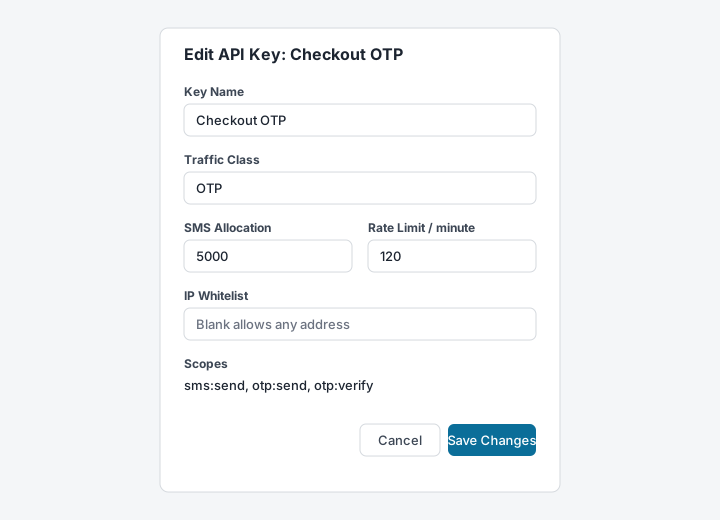
The only dialog on this page is **Edit API Key**. It changes the name, traffic class, allocation, rate limit, IP whitelist, and scopes. It does not show the secret again.
### Recommended Storage Practices [#recommended-storage-practices]
1. **Environment Variables**: Store your key in `.env.local` or `.env` and add the file to your `.gitignore`:
```bash title=".env.local"
SMSPRO_API_KEY=sk_test_example
SMSPRO_BASE_URL=https://api.smspro.com
```
2. **Never Commit to Source Control**: Do not hardcode API keys directly in client-side mobile applications, frontend React/Vue code, or public GitHub repositories.
3. **Key Rotation**: When rotating credentials, generate a new scoped key first, update your production environment variables, verify successful traffic, and then revoke the old key.
---
## Next Step [#next-step]
Learn how to attach your credentials and construct valid HTTP request headers in [Authentication](/docs/getting-started/authentication).