

Error Handling & Diagnostics
Comprehensive technical troubleshooting guide covering RFC 7807 error taxonomy, carrier failure diagnostics, and request tracing.
When integrating telecommunication services, distinguishing between API-layer failures (e.g. invalid authentication or schema violations) and telecom-layer failures (e.g. handset out of coverage or spam filtering) is critical to diagnosing issues quickly.
1. Error Taxonomy & Layering
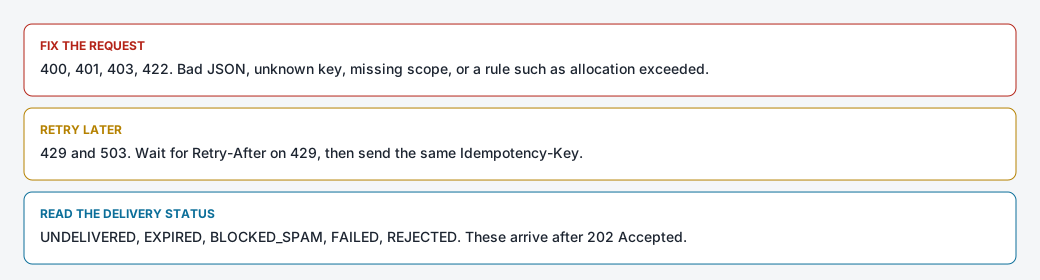
Errors in SMS Pro originate at three distinct architectural tiers:
2. RFC 7807 Problem Details Format
All synchronous API errors return structured JSON using the RFC 7807 application/problem+json standard:
{
  "type": "https://docs.smspro.com/errors/invalid-phone",
  "title": "Invalid Recipient Phone Number",
  "status": 400,
  "detail": "For local Ghana numbers starting with 0, exactly 10 digits are required (e.g. 0241234567). Given: 024123",
  "code": "INVALID_PHONE_NUMBER",
  "instance": "/api/v1/public/sms/send",
  "requestId": "req-9b1deb4d-3b7d-4bad-9bdd-2b0d7b3dcb6d",
  "timestamp": "2026-11-18T09:15:00Z"
}
Essential Diagnostic Fields
code: A stable, machine-readable enum. Write application branching logic againstcode, never by parsingdetailstrings.requestId: The unique trace ID generated at the gateway edge. Quote this ID when submitting support tickets or searching console logs.invalidParams: A detailed array identifying specific field validation errors on400responses.
3. Comprehensive Application Error Codes
| Application Code | HTTP Status | Root Cause | Resolution |
|---|---|---|---|
UNAUTHORIZED | 401 | The key is missing, unknown, or the caller is outside the IP whitelist. | Check the key and the whitelist. |
FORBIDDEN_SCOPE | 403 | The key lacks the required scope. | Edit scopes under Developer > API Keys. |
API_KEY_ALLOCATION_EXCEEDED | 422 | The key has used its SMS allocation. | Raise the allocation or use another key. |
INVALID_PHONE | 422 | The phone number is missing or not a usable number. | Send a local or international number SMS Pro can clean. |
RATE_LIMIT_EXCEEDED | 429 | The key is over its per-minute limit. | Wait for Retry-After, then retry with the same idempotency key. |
4. Diagnosing Common Integration Anomalies
Anomaly 1: "Subscribers are receiving duplicate text messages"
- Cause: Your application is timing out waiting for an HTTP response, catching an error, and retrying the request without an
Idempotency-Key. The initial request succeeded on the gateway, and the retry sent a second message. - Fix: Always generate a unique
Idempotency-Key(UUID v4) for each logical message. When retrying network drops, send the same key. SMS Pro will return the cached response rather than queueing a second message.
Anomaly 2: "Messages report SENT, but no Delivery Report arrives"
- Cause: The subscriber's handset is powered off, out of signal range, or roaming on a network with delayed DLR forwarding.
- Fix: Check
GET /api/v1/public/sms/messages/{messageId}. If the message remains inSENT, the carrier SMSC is still attempting delivery within its 24-hour validity window.
Anomaly 3: "A 160-character message was billed as 3 units"
- Cause: An invisible Unicode character (such as an emoji, non-breaking space, or curly apostrophe
’) forced the message into UCS-2 encoding, reducing the capacity to 70 characters per segment. - Fix: Run dynamic text through a GSM-7 sanitizer or inspect the
segmentCountin the202 Acceptedresponse.
Related Documentation
Wallet, Billing & Usage Accounting
Understand prepaid unit deduction mechanics, segment-based billing math, insufficient balance handling, and programmatic wallet queries.
Architecture, Resiliency & Scale
Production integration architecture covering queue-based decoupling, rate limiting, exponential backoff with jitter, and circuit breaker patterns.