

Message Lifecycle & Routing
Submission acceptance, later delivery, traffic classes, and message statuses.
A common misconception among developers new to telecommunications is assuming that receiving an HTTP 200 or 202 response means the recipient's mobile phone has buzzed. In reality, SMS operates as an asynchronous, distributed store-and-forward system.
1. Submission Acceptance vs. Handset Delivery
The transmission of an SMS is bifurcated into two distinct phases:
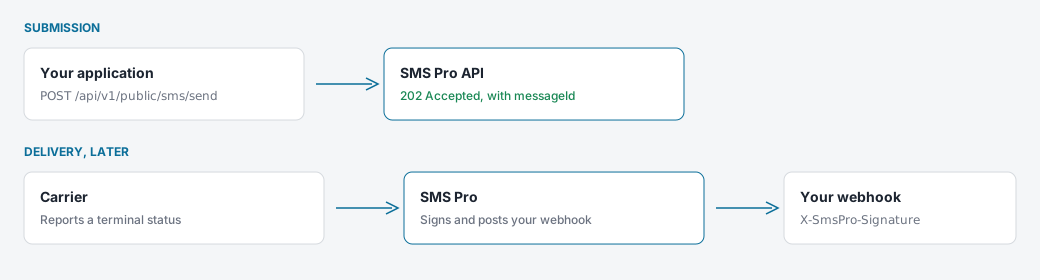
Phase 1: Acceptance
- The API checks the key, the body, the numbers, and the idempotency key.
- It returns HTTP
202 Acceptedwith amessageId. That means SMS Pro has accepted the message. It does not mean the handset has it yet.
Phase 2: Delivery
- The carrier delivers the message.
- SMS Pro later posts a signed webhook with the terminal status.
2. Ingestion Pipeline & Architecture
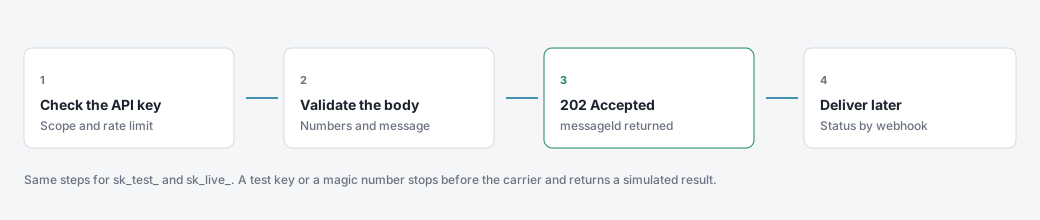
When you call POST /api/v1/public/sms/send, SMS Pro checks the key, validates the body, and returns 202 Accepted. Delivery happens after that response.
3. Traffic Classes & Priority Queuing
Set the traffic class on the API key so verification messages are not held behind a large broadcast.
| Traffic class | Use it for |
|---|---|
| OTP and 2FA | One-time passwords and MFA. |
| Transactional | Receipts, booking updates, and account alerts. |
| Marketing | Promotions and announcements. |
Keep OTP off the marketing path
A marketing broadcast does not have to delay OTP traffic. Put verification on an OTP key and broadcasts on a marketing key.
4. The Message State Machine
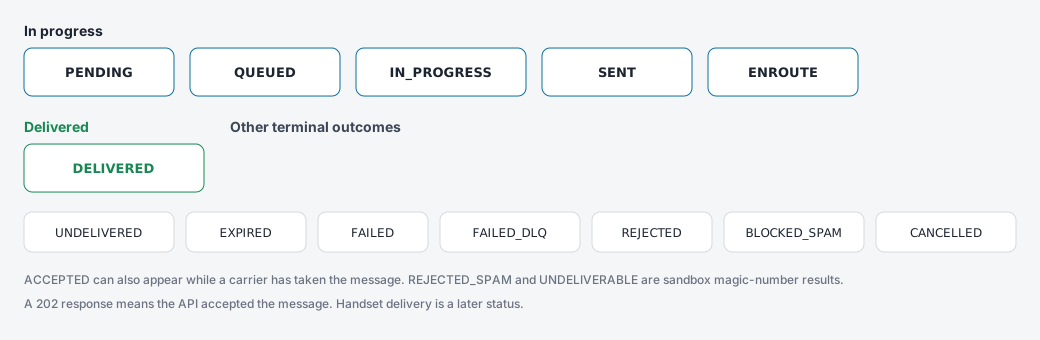
Statuses you can see on a message:
While it is moving
PENDING, QUEUED, IN_PROGRESS, SENT, ENROUTE, and ACCEPTED.
When it is finished
DELIVERED, UNDELIVERED, EXPIRED, FAILED, FAILED_DLQ, REJECTED, BLOCKED, BLOCKED_SPAM, and CANCELLED.
REJECTED_SPAM and UNDELIVERABLE are results of the sandbox magic numbers. Live content filtering is reported as BLOCKED_SPAM.
5. Validity Periods & Message Expiry
When a recipient handset is out of coverage or turned off, the carrier SMSC stores the message and periodically retries delivery.
- Default Validity Timer (TTL): 24 hours.
- Retry Schedule: Carriers typically retry with an initial burst (after 1 minute, 5 minutes, 15 minutes), transitioning to hourly polling.
- Expiry Transition: If the subscriber does not reconnect within the validity window, the SMSC drops the message from its buffer and emits an
EXPIREDstatus receipt.