

Sender ID Management & Compliance
Request an alphanumeric sender name, the approval statuses, and what the request form collects.
A sender ID is the name shown on the handset. On SMS Pro it is an alphanumeric name of up to 11 characters, such as MYBRAND.
1. Request form
Open Sender ID and choose Request new sender ID (/customer/sender-id/request).
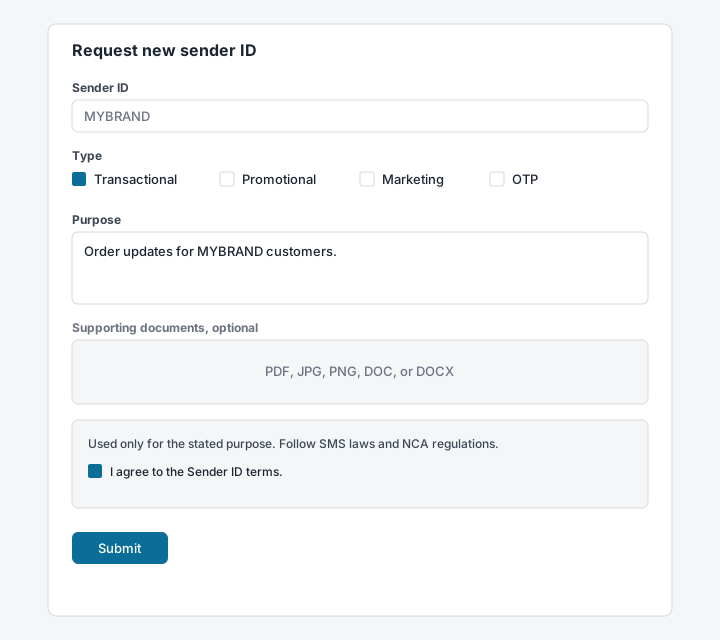
| Field | Required | What to enter |
|---|---|---|
| Sender ID | Yes | Up to 11 characters. The placeholder is MYBRAND. |
| Type | Yes | Transactional, Promotional, Marketing, OTP, or all of them. |
| Purpose | Yes | What the messages are for. |
| Supporting documents | No | PDF, JPG, PNG, DOC, or DOCX. |
| Terms | Yes | Accept the Sender ID terms before submit. |
The terms on the form say the name is used only for the stated purpose, that messages follow applicable SMS laws and NCA regulations, and that spam is prohibited. The name is not used for sending until the terms are accepted after approval.
2. Statuses
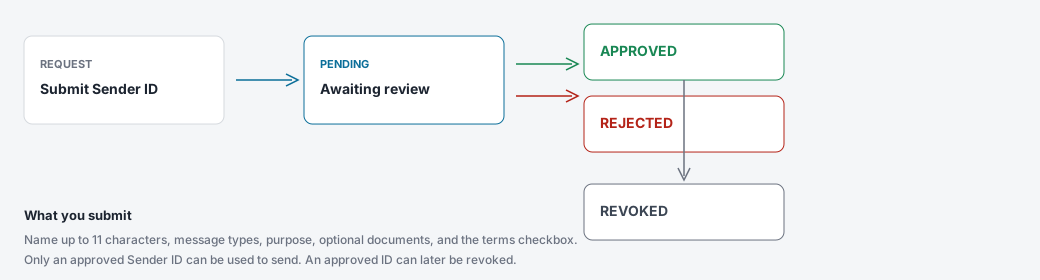
| Status | Meaning |
|---|---|
PENDING | The request is waiting for review. |
APPROVED | The name can be used on live sends. |
REJECTED | The request was not approved. Correct it and submit again. |
REVOKED | An approved name was withdrawn. |
3. Quiet hours
Marketing messages are held from 21:00 to 07:00 local time. Transactional messages and OTP are not held. Account settings shows this window. It applies to every account.