

Going Live
The complete production readiness checklist for launching your SMS Pro integration onto live telecommunication carrier routes.
Transition from an sk_test_ key to an sk_live_ key on https://api.smspro.com after the account can pay for messages and the sender name is approved.
Checklist
| Step | What to do |
|---|---|
| 1 | Confirm the display name and phone on Account settings. |
| 2 | Request a Sender ID and wait until it is approved. |
| 3 | Add credit from Wallet. |
| 4 | Create an sk_live_ key with only the scopes you need. |
| 5 | Verify X-SmsPro-Signature on delivery webhooks. |
| 6 | Send an Idempotency-Key on every mutating POST. |
| 7 | Retry 429 and 503 with backoff, using the same idempotency key. |
1. Account profile
Open Account settings after sign-in and save the display name and phone number. Email changes are done on the Authorisation Server.
The same page lists email, SMS, and marketing notification toggles. Marketing messages are held from 21:00 to 07:00 local time. Transactional messages and OTP are sent during those hours. That quiet-hours window applies to every account.
2. Request a Sender ID
A custom alphanumeric sender name has to be approved before live traffic can use it.
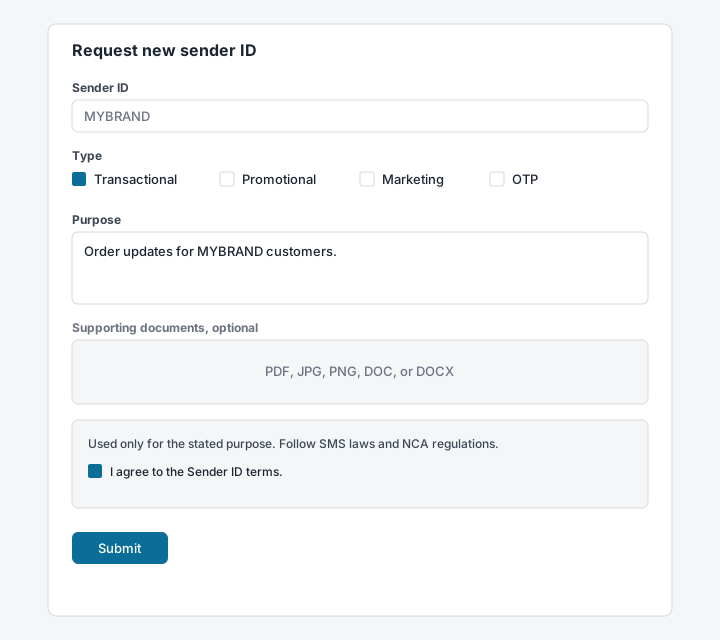
- Open Sender ID and choose Request new sender ID (
/customer/sender-id/request). - Enter a name of up to 11 characters, the message types, and the purpose.
- Attach supporting documents if you have them. They are optional.
- Accept the Sender ID terms and submit.
- The request stays Pending until it is Approved. A rejected request can be corrected and sent again. An approved name can later be revoked.
Until it is approved
Send with a sender name that is already approved on the account.
3. Add credit
Live segments draw on the wallet.
- Open Wallet (
/customer/wallet). - Use Top Up Wallet (
/customer/wallet/top-up) or Buy SMS Bundle (/customer/wallet/buy-bundle). - Enter the amount and complete checkout.
4. Create a live key
- Open Developer > API Keys.
- Set Environment to Live (
sk_live_). - Choose the traffic class and enter an SMS allocation.
- Select only the scopes the integration needs.
- Optionally fill IP whitelist.
- Click Add API Key, copy the secret from the banner, and store it outside the repository.
5. Secure Your Webhook Receiver
When receiving asynchronous Delivery Receipts (DLR) in production, always verify the cryptographic signature in the X-SmsPro-Signature header to ensure payloads originate exclusively from SMS Pro:
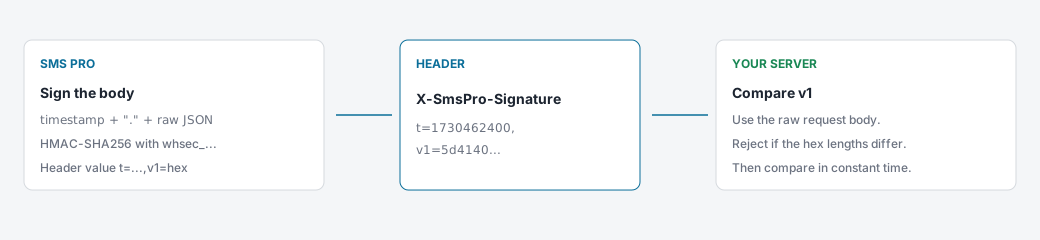
import crypto from 'node:crypto';

export function verifyWebhookSignature(
  rawPayload: string,
  signatureHeader: string,
  signingSecret: string,
): boolean {
  const parts = Object.fromEntries(
    signatureHeader.split(',').map((part) => {
      const index = part.indexOf('=');
      return [part.slice(0, index), part.slice(index + 1)];
    }),
  );
  const timestamp = parts.t;
  const expected = parts.v1;
  if (!timestamp || !expected) return false;

  const age = Math.abs(Math.floor(Date.now() / 1000) - Number(timestamp));
  if (!Number.isFinite(age) || age > 300) return false;

  const computed = crypto
    .createHmac('sha256', signingSecret)
    .update(`${timestamp}.${rawPayload}`)
    .digest('hex');
  const left = Buffer.from(computed, 'utf8');
  const right = Buffer.from(expected, 'utf8');
  if (left.length !== right.length) return false;
  return crypto.timingSafeEqual(left, right);
}- Return HTTP
200promptly. - Do later work on your own job queue after you have verified the signature.
6. Switch the key
SMSPRO_BASE_URL=https://api.smspro.com
SMSPRO_API_KEY=sk_live_example
SMSPRO_WEBHOOK_SECRET=whsec_example
7. Check the first live message
- Send one message to a phone you control.
- Confirm the sender name and the text.
- Open Developer > API Logs (
/customer/developer/api-logs) and confirm202. - Watch the wallet on the dashboard. Account settings can send email and SMS alerts. There is no separate wallet-threshold page.
Next
Continue with the transactional SMS guide and the recipes.