

Environments
Compare test keys and live keys on the SMS Pro API.
SMS Pro has one API, https://api.smspro.com. The key you send chooses simulated delivery or carrier delivery.
Key comparison
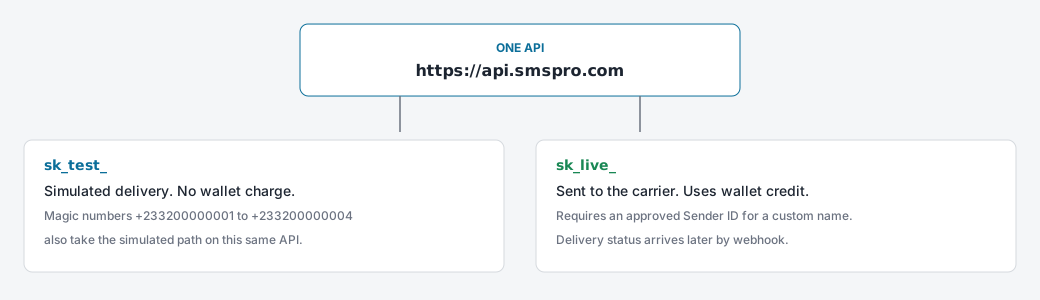
sk_test_ | sk_live_ | |
|---|---|---|
| Base URL | https://api.smspro.com | https://api.smspro.com |
| Delivery | Simulated. No handset is contacted. | Sent to the carrier. |
| Wallet | Not charged. | Charged per segment. |
| Result | 202 with status ACCEPTED_SANDBOX and a sim_ message id. | 202 and a later delivery status. |
| Magic numbers | Select a specific simulated outcome. | The same four numbers are still simulated, even on a live key. |
| Sender ID | A test name is accepted. | A custom name must be approved. |
Test keys
A test key checks authentication, scopes, and the request body, then returns a simulated acceptance. It also posts a simulated delivery webhook when you have a webhook URL.
curl -X POST "https://api.smspro.com/api/v1/public/sms/send" \
  -H "X-Api-Key: sk_test_example" \
  -H "Content-Type: application/json" \
  -d '{
    "to": "+233200000001",
    "senderId": "SMSPRO",
    "message": "Testing from local environment."
  }'
Read the magic-number outcomes in Testing in Sandbox.
Live keys
A live key sends to the carrier and uses wallet credit.
curl -X POST "https://api.smspro.com/api/v1/public/sms/send" \
  -H "X-Api-Key: sk_live_example" \
  -H "Content-Type: application/json" \
  -d '{
    "to": "+233241234567",
    "senderId": "MYAPP",
    "message": "Your verification code is 491029."
  }'
Before live traffic:
- Keep a prepaid balance.
- Use an approved
senderId, or the platform default. - Send only to people who have opted in.
Configuring Your Environment
We recommend decoupling the gateway URL and API key from your application logic using environment variables.
Local Development (.env.local)
SMSPRO_BASE_URL=https://api.smspro.com
SMSPRO_API_KEY=sk_test_948f293048a1b2c3d4e5f60718a2b3c4
Production Deployment (.env.production)
SMSPRO_BASE_URL=https://api.smspro.com
SMSPRO_API_KEY=sk_live_891024ab9012cd34ef560718a2b3c4d5
Dynamic Client Initialization Example
const baseUrl = process.env.SMSPRO_BASE_URL || 'https://api.smspro.com';
const apiKey = process.env.SMSPRO_API_KEY;

if (!apiKey) {
  throw new Error('Missing SMSPRO_API_KEY configuration.');
}

export async function sendSms(to: string, senderId: string, message: string) {
  const response = await fetch(`${baseUrl}/api/v1/public/sms/send`, {
    method: 'POST',
    headers: {
      'Content-Type': 'application/json',
      'X-Api-Key': apiKey,
      'Idempotency-Key': crypto.randomUUID(),
    },
    body: JSON.stringify({ to, senderId, message }),
  });

  return response.json();
}
Next Step
Make your very first live API call in Your First API Request.
Authentication
Secure your API requests with X-Api-Key or Bearer tokens, enforce granular scopes, and protect operations with idempotency.
Your First API Request
Send your very first transactional SMS message in under five minutes with copy-pasteable examples in cURL, TypeScript, Python, PHP, and Java.