

Testing in Sandbox
Test with an sk_test_ key and magic phone numbers on the SMS Pro API.
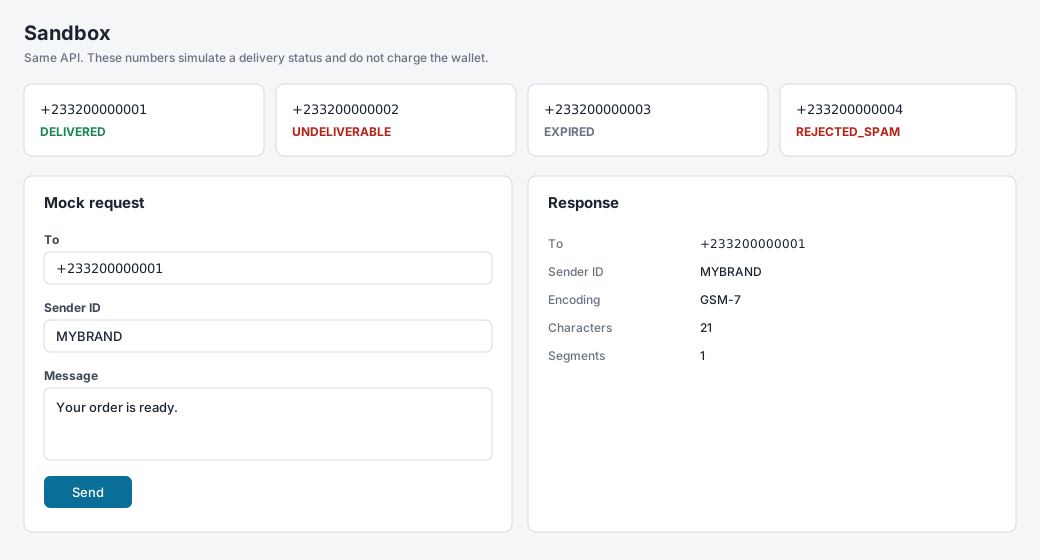
Use an sk_test_ key on https://api.smspro.com to exercise authentication, validation, and webhooks without contacting a handset or charging the wallet. The same numbers are on Developer > Sandbox (/customer/developer/sandbox).
Test-key rules
- The request is validated the same way as a live send.
- The response is
202with statusACCEPTED_SANDBOXand a message id that starts withsim_. - The wallet is not charged.
- A simulated delivery is posted to your webhook URL.
Magic test numbers
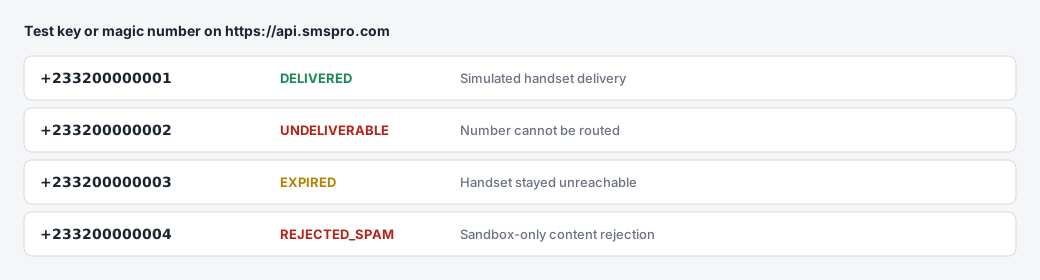
These numbers select the simulated outcome. They take the simulated path even when the key is sk_live_.
| Number | Simulated status |
|---|---|
+233200000001 | DELIVERED |
+233200000002 | UNDELIVERABLE |
+233200000003 | EXPIRED |
+233200000004 | REJECTED_SPAM |
REJECTED_SPAM is a sandbox result. Live traffic uses statuses such as BLOCKED_SPAM.
Example
curl -X POST "https://api.smspro.com/api/v1/public/sms/send" \
  -H "X-Api-Key: sk_test_example" \
  -H "Content-Type: application/json" \
  -d '{
    "to": "+233200000004",
    "senderId": "SMSPRO",
    "message": "Testing spam rejection flow."
  }'
The 202 body includes the simulated message id. The matching status is sent to your webhook. Do not expect a stored message lookup to return this simulation.
Testing Webhooks & Delivery Receipts
In production, carrier networks send asynchronous Delivery Receipts (DLR) back to SMS Pro once a handset acknowledges receipt. SMS Pro forwards these events to your registered webhook URL.
Testing Your Webhook Endpoint via CLI
You can trigger a mock webhook ping to verify that your local webhook handler can receive, parse, and verify signatures without sending an actual message:
curl -X POST "https://api.smspro.com/api/v1/public/mfa/workflows/test-webhook" \
  -H "X-Api-Key: sk_test_948f293048a1b2c3d4e5f60718" \
  -H "Content-Type: application/json" \
  -d '{
    "webhookUrl": "https://api.yourdomain.com/webhooks/smspro",
    "eventType": "SMS_DELIVERY_STATUS"
  }'
The gateway immediately sends a simulated signed delivery receipt to your endpoint and returns the HTTP status code received from your server:
{
  "status": "success",
  "data": {
    "success": true,
    "statusCode": 200,
    "latencyMs": 48,
    "webhookUrl": "https://api.yourdomain.com/webhooks/smspro"
  }
}
Balance
GET the balance endpoint with your test key. It returns the account balance. Test sends do not reduce that balance.
API logs
Calls are listed in the SMS Pro console under Developer > API Logs (/customer/developer/api-logs). Open a row to see the request and response.
Next Step
Once your integration handles sandbox requests and webhook events reliably, review the launch requirements in Going Live.